Showing posts with label Tools. Show all posts

Friday, July 1, 2011

Test Drive OmniPeek 6.6


Last week, WildPackets released OmniPeek 6.6, the first network analyzer with 802.11n 3-stream wireless support. You can test it out but downloading the Wireless Essentials Pack. The pack includes the OmniPeek Enterprise 6.6 demo software as well as three popular wireless add-ons: Wireless Signal Stats, Wireless Channel Aggregator, and Roaming Latency Analyzer.

The video below with Jay Botelho, Director, Product Management, and Chris Bloom, developer and evangelist of WildPackets will tell you all about OmniPeek's wireless capabilities.


Wednesday, November 10, 2010

Eleonore exploit pack


Exploit packs have been selling in the underground for hundreds of dollars in recent years. These pre-packaged kits are designed to probe the visitor’s browser for known security vulnerabilities, and then use the first one found as a vehicle to quietly install malicious software. They normally comes with a Web administration page, which gives the attacker real-time statistics about victims, such as which browser exploits are working best, and which browsers and browser versions are most successfully attacked. Those commonly found in the market were iPack, Crimepack and Eleonore.

The latter, Eleonore, is the most popular kit and have been making the headlines recently. It is claim to cost between USD$500 - USD$1000 (based on the version). The package was updated approximately every month with the latest browser, PDF and Java vulnerabilities. These kit providers provide "secured" support, updates and even cleanup of the package service if necessary.


Eleonore Web administration page


Crimepack Web administration page

w01f advise: Always patch up your system, especially Internet browser, Java, Flash and PDF applications.

Tuesday, November 9, 2010

FireSheep Vs BlackSheep

Firesheep
It is a Firefox extension that demonstrates HTTP session hijacking attacks. HTTP session hijecking (commonly known as Sidejacking) is a common vulnerability, which sniff the network traffic and extract victim's session information or cookie. With the session information, it can gain access to the victim's account without the need of username and password.

I have previously blog on sidejacking with Ferret and Hamster.

Firesheep is free, open source, and is available now for Mac OS X and Windows.


BlackSheep
BlackSheep, also a Firefox plugin is designed to combat Firesheep. BlackSheep does this by dropping ‘fake’ session ID information on the wire and then monitors traffic to see if it has been hijacked. While Firesheep is largely passive, once it identifies session information for a targeted domain, it then makes a subsequent request to that same domain, using the hijacked session information in order to obtain the name of the hijacked user along with an image of the person, if available. It is this request that BlackSheep identifies in order to detect the presence of Firesheep on the network. When identified, the user will be receive the following warning message:


Please note that Firesheep and BlackSheep cannot be installed on the same Firefox instance as they share much of the same code base. If you want to run both Firesheep and BlackSheep on the same machine, they should be installed in separate Firefox profiles.

Monday, November 8, 2010

DotDotPwn 2.1

DotDotPwn is a Directory Traversal Fuzzer. It works on HTTP, FTP and TFTP servers directory traversal vulnerability. It's written in perl language and can be run either under *NIX or Windows platform.

It is written by chr1x (member of our sectester group) and nitr0us. It had just released v2.1, which is more flexible intelligent. So far, 8 security vulnerabilities were discovered by this tools. It was also voted to be included in the next release of the Backtrack Distro.

Well Done chr1x!!

Tuesday, July 27, 2010

Windows Lnk Exploit Protection Tool

The Recent Microsoft vulnerability in Windows Shell could allow Remote Code Execution such as using shortcut. Many malwares were found exploiting this vulnerability. Sophos had recently released a free protection tool that claims to be able to detect and block this Windows shortcut exploit from running. It will also work with your existing Anti Virus.

The tools can be downloaded from this official website.

Below is the demo video of the tools


Related Report:
- TechNet: Microsoft Security Advisory (2286198)

Disclamer: I do not in any way endorsed this tool nor responsible for any problem or issue cause by it.

Monday, May 31, 2010

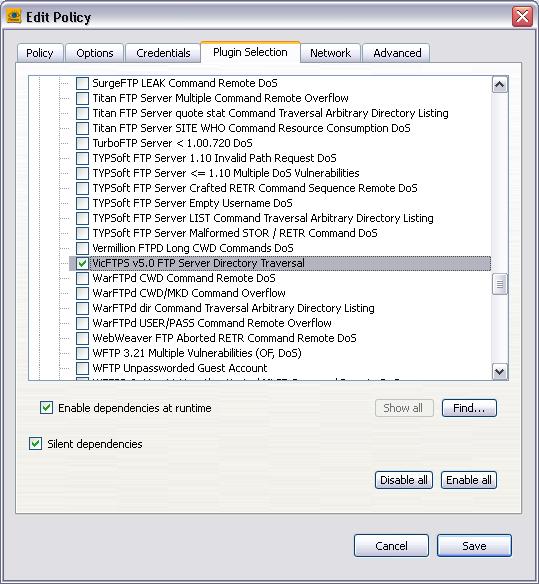
Nessus Plugin for VicFTPS Vulnerability

Wrote a Nessus Plugin to test on the VicFTPS Directory Traversal Vulnerability, that was discovered by chr1x (member of our sectester team).

This plugin will exploited the directory traversal vulnerability and return results if successful. I will be sending it to Nessus to get it added into the Plugin Feeds to be share with everyone. You can download the plugin here.

-Test with NASL Interpreter


- Added the Plugin


-Result from a scan


References:
- SecurityFocus: VicFTPS Directory Traversal Vulnerability

Friday, February 5, 2010

Web Security Rating

"Web Security Rating" is a website or tools that are hosted by security vendors or team that rate each web domain whether they are safe to access.

Was trying out some of this website and tools to recommend to my colleagues and friends. Notice that even big vendor can give an incorrect rating for publicly known malicious sites.

MalwareURL results Did a few tests and decided to show the result of "aboutadding.com". On the Malwareurl website, it shows a list of malwares detected from that domain.

McAfee SiteAdvisorMcAfee SiteAdvisor detected "potential security risks ... Use with extreme caution".

Norton Safe WebWhile Norton Safe Web given a "SAFE" rating for this site (even though a user feedback that the domain is harmful).

Besides McAfee SiteAdvisor and Norton Safe Web, there are also other common tools such as TrendMicro's TrendProtect and Finjan SecureBrowsing.

Google WarningEven Google provide warning for potential harmful sites.

This blog is not to comment on which vendor is better. Just want to share some of the available tools on secure web surfing and to advise users not to trust on one result.

Friday, September 11, 2009

OpenMR: Open Mail Relay

I have recently written a simple tool that check for Open mail relay server. I used to wrote Object Oriented Programming using Java and C++ during my Uni days. But they were like almost 10 yrs ago. But i still work on Unix shell script and Windows script host in these few years, writing system maintanance (backup, health alerts, etc) and hardening script.

This is my first time writing a program in Perl. This tool will check if the mail server of a domain is configure as an open relay. It can also query the IP address of those servers.

Running OpenMR:
OpenMR with help

Running OpenMR with "info" option:
OpenMR with info option

OpenMR found open relay:
OpenMR found open relay

Feel free to download the tool and give comments by emailing to me.

Go to this link - OpenMR.zip to download the tool.
(MD5:55175a530923967ee5eeeca83ffe63e7)


New Update - 14/09/09
Thanks for the feedback. I have improved and added the feature that uses IP address, instead of just domain.

* Version 0.2.0
- Add feature to check open relay using IP address

Running OpenMR version 0.2:
OpenMR version 0.2

Running OpenMR using IP address with "info" option:
OpenMR using IP with info option

Download version 0.2.0 - OpenMR_0.2.zip
(MD5:14a61ea4e3c5bbff2f54e983b7d9e4f5)

Other Link:
- SecurityTube Tools - OpenMR

Sunday, July 27, 2008

Can i "undelete" my files?

Recently i did a simple survey among my friends, asking them whether files/data deleted from the computer can be recovered? Most of them (including non-IT profession) knows that it is possible to recover deleted data. They claim that they got to know about it from the "Edison" incident.

But there are still one or two of them unaware that deleted data may still be recoverable (including a IT application analyst with many years of working experience). So i decided to write this post to share some of my knowledge on "file deletion/recovery" (known as Data remanence).

Most Computer system (Operating System, e.g Windows) do not actually remove the contents of a file when it is deleted. Instead, they simply remove the file's entry from the file system directory. The data of the file remains on the storage medium (harddisk, flashdrive, floppy or etc). The data will remain there until the operating system reuses the space for new data. Nowadays with very large harddisk in our system, the space may not even reuse.

Several questions were asked by them during the survey such as "How can we recover those deleted files ?", "Any recommended free tools ?" and "Any ways to delete the files permenantly ?". So below were my answers to those questions.

File Recovery Tools
There are many file recovery tools available in the Internet, some are free and others require license ($$$). I have found 2 Windows-based "freeware" tools (PC Inspector File Recovery and Recuva) to share with you all. PC Inspector File Recovery have better features and personally recommended for IT users, whereas Recuva will be more simple and user friendly.

CONVAR PC INSPECTOR™ File Recovery 4.xCONVAR PC Inspector™ File Recovery 4.x - a data recovery program that supports the FAT 12/16/32 and NTFS file systems. Some "special" features -
> Finds partitions automatically, even if the boot sector or FAT has been erased or damaged
> Recovers files with the original time and date stamp
> Supports the saving of recovered files on network drives
> Recovers files, even when a header entry is no longer available

Piriform RecuvaPiriform Recuva - a Windows utility to restore files that have been accidentally deleted from your computer. This includes files emptied from the Recycle bin as well as images and other files that have been deleted by user error from digital camera memory cards or MP3 players. It will even bring back files that have been deleted by bugs, crashes and viruses!

Secure Deletion
To permenantly delete your data/files, you will need to do secure deletion (or data sanitization). I have talk about this in my previous posting "What is data sanitization? - on April 6 2008". Please refer to this posting to learn more about secure deletion and the tools that i recommended.

Related Posts:
- Edison Chan Sex Scandal. Lesson to be learned! - on February 17, 2008
-
What is data sanitization? - on April 6 2008

Friday, May 9, 2008

Stop your service pack!

New Service Pack was released for Windows XP. Windows XP Service Pack 3 was out on 6 May. It is cumulative, which will include all fixes from the previous service packs.

But for this posting, instead of advising readers to update the service pack, i will be introducing a tool to stop your system from updating the latest service pack. This tool, Windows Service Pack Blocker Tool Kit, allow administrators to temporarily prevent installation of Service Pack updates through Windows Update.

For system administrator, every new patches are potentially able to bring down their systems. Having this tool to prevent automatic updating of Service Pack will allow administrator to have more time to test their systems before applying the service pack.

This toolkit will only prevent the service pack from being delivered over Windows Update. It will not able to prevent the installation of the service pack from CD/DVD, or from the stand-alone download package. For more detail on this tool, go to the download link below.

Related Links:
- Windows Service Pack Blocker Tool Kit

- Windows XP Service Pack 3 download

- List of fixes that are included in Windows XP Service Pack 3

Sunday, April 6, 2008

What is data sanitization?

I always wanted to write about secure data deletion (or data sanitization), especially when we read news on sensitive data (e.g Credit card numbers) been collected from 2nd hand harddisks and discarded system.

Many people thought that when they empty their "Recycle Bin" in their system, all the data are totally lost and cannot be recovered. The data was only not accessable by the OS but it can be easily recovered using Data recovery software (easily found in the Internet). When you empty the recycle bin, the data was still on the physical harddisk. The data were not "erased", only mark as "overwritable" by the OS and will only be over-written when new data need to be saved in the Harddisk.

Method of Secure Deletion
- Overwriting
It is the most common way of securely deleting data these days. It is commonly known as data wiping. Basically, this method simply overwrite the data with a pattern of all zeros or ones.
But as more and more advanced data recovery and forsenic methods used, simply overwriting with ones or zeros was not effective. More patterns of overwriting were used. Beside the alternating patterns of using ones and zeros, patterns uses the complement, bitwise inverse and NOT of the existing data were also used.The Gutmann method, which uses 35 patterns to overwrite data.

The more patterns you used, the more secure the deletion will be. But more time will also be needed to complete the "deletion" as the system need to overwrite the same amount of data the number of times (patterns).

Previously, overwriting is a DoD (US Department of Defense) acceptable method of secure deletion for magnetic media. DoD 7 passes (patterns) method was widely followed as a best practise. But due to the problem of media degration and errors, overwriting on some areas of the media may not be possible. On Nov 2007, overwriting is no longer accepted as a D0D secure deletion method. Only degaussing or physical destruction is acceptable.

Note:
To recommend a program to securely delete a harddisk, i will recommend DBAN (
Darik's Boot and Nuke). It is an freeware (based on open source project), which supports DoD 7 passes and Gutmann method. It can be boot up from floppy, CD or flashdrive. It can also work on IDE, SCSI and SATA harddisk.
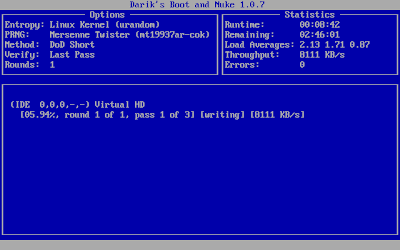
Darik's Boot and Nuke
- Degaussing
It uses magnetic field that makes the data in the magnetic media to be unreadable. Degaussed harddisks are normally not operational as the magnetic field will erase the low-level formatting(servo control data) that is created during manufacturing.

- Physical Destruction
Physically breaking the media is the most straight forward way of destroying the data. But in order to securely destroying the data, grinding and shredding should be properly carried out. Incinerating of the media can also be used as a way to physically destroying of data.
Using of corrosive chemical, such as acids, can also be used.

- Encryption
With FDE (Full Disk Encryption) harddisk getting popular in the market, encryption became the fastest and probably the easiest way of securely "delete" all the data in a harddisk.
Basically how it works is that since the harddisk is fully encryption, by simply "overwriting" (secure delete) the decryption key, it is almost "impossible" to recover any data from the harddisk. The time taken to overwrite the decryption key is much faster than overwrite the whole harddisk.

Some recommended software (Overwriting):
- Eraser is a secure data removal tool for Windows. It supports DoD 3/7 passes and Gutmann method. It can also be scheduled to securely delete files/folders.

- Darik's Boot and Nuke is used for secure deletion of the whole harddisk. It is an freeware (based on open source project), which supports DoD 3/7 passes and Gutmann method. It can be boot up from floppy, CD or flashdrive. It can also work on IDE, SCSI and SATA harddisk.

Saturday, February 16, 2008

Is your port being probed?

Nmap recently released version 4.5. It is their 10th anniversary since released in 1997. The new version comes with a new traceroute feature. There is also has a new OS fingerprinting detection engine and a new scripting engine. There is an addition of the ZeNmap (an GUI for Nmap) and the new port disposition explanations.

Beside introducing the new version of Nmap, i was recently been asked "Can we detect or prevent Nmap scanning?". I think many people (with security knowledge) will know that a proper Intrustion Detection / Protection System (IDS/IPS) can easily detect any scanning activities. A properly configured firewall can prevent a system from being scanned.

But frankly, Nmap scanning is quite harmless to your system. It is merely for reconnaissance on the system. If anyone who do not wish to implement a full IDS/IPS but still wanted to detect Nmap scanning, a progam named Port Scan Attack Detector (PSAD) will be useful.

PSAD is a lightweight network IDS that works on major Linux platform. It can detect port scan and other suspicious traffic. It is not able to do packet defragmentation and tcp stream reassembly like a full network IDS, but it incorporates many of the TCP, UDP, and ICMP signatures and able to detect advanced port scans (e.g SYN, FIN, XMAS). It can also work with iptable to block any detected traffic.

Related Sites:
- Nmap 4.5
- psad - Intrusion Detection with iptables

Monday, December 24, 2007

Mobile Warrior - Part 1, Disk Encryption

As a mobile warrior, doing active work on our laptop is part of the daily event. The laptop is the closest device to us next to the mobile phone.

We keep almost anything in it, personal and work matter. It is not a common news that important data are lost and there are no proper means of protecting it.

Is the company to blame or should we as the data custodian responsible? While these questions can open up a whole new can of worms for discussion. We can take some simple measures into our own hand to ensure something can be done or at least things are safe during your watch.

Thanks to the new power of Open Source, most of the applications are free and with qualities equal if not better than the paid version. In addition, some are just simple behavior changes and prospective that can be considered that are again: Free.

To start off let consider disk encryption. The simple thing to do is to hide the data from easy access. This can be done by simply use any encryption software that create single or multi-folders that look like partitioned disk which you can mount and dismount accordingly.

A good example of such disk encryption software (Open Source) : http://www.truecrypt.org/
After playing with it, you might get addicted to have everything encrypted down to the last thumb-drive but remember to back up the key files as well as the good strong password that you had created.

If not, you will be having more problems trying to recover it. Have fun.

Thursday, September 20, 2007

Is the port opened?

Insecure logoPeople have been telling me that Port scanning is the basic for any security enthusiasts. Port Scanning is normally done on the "Reconnaissance" phase of the Hacking cycle. So port scanning knowledge should be covered in the beginning of this blog.
The most famous and widely used port scanner is NMAP. So Nmap will be discussed here.

Nmap is a free port scanner that can be downloaded from insecure.org. It runs on various unix such as Linux, Solaris, BSD, etc. It also runs on windows and Mac OS.
Trinity hacking using NmapNmap was used on several movies such as Swordfish and Matrix Reloaded.

Nmap in actionIn the movie "Matrix Reloaded", Trinity was using the Nmap to hack the system (shown in the picture).

After using Nmap, you may find that there are several different port state such as Open, Closed and filtered. Following are the description for each state.
Open – There is a process running that listens for a connection on that port.
Closed – There is no process running that listens on that port. Normally, a TCP RST packet will be received as the response.
Filtered – The packet is likely to be blocked and dropped by a firewall and no response is received. Note: the status of a filtered port is unknown as it could be either open or closed.

Nmap have three main functions, Port Scanning, Host discovery and OS fingerprinting. Below are some of the general usage of Nmap:

Port Scanning
- TCP ping
An ACK packet is sent to port 80 (by default) of the destination host. If the host responds with a RST packet, nmap will consider the host alive and will perform a port scan immediately.

The following syntax to perform TCP ping:
nmap -PT[port_number] host
Example:
nmap -PT 192.168.1.1

- TCP Connect
The TCP Connect scan complete the three-way handshake, those listening destination port will respond to the connection attempt. This method is not stealthy as the connection will be logged.
The following syntax to perform TCP connect scan:
nmap -sT host
Example:
nmap -sT 192.168.1.1

- TCP SYN / Half-Open
The SYN packet is sent out to the destination host. If the target host is listening on a particular port, it will respond with a SYN+ACK. If the host is alive but not listening on a particular port, a RST packet will be received. This scan will be stealthy as it does not complete the TCP three-way handshake.
The following syntax to perform TCP SYN scan:
nmap -sS host
Example:
nmap -sS 192.168.1.1

- FIN
The FIN packet is sent out to the destination host. If the target host is alive but not listening on a particular port, it will respond with a RST packet. However if the host is listening on a particular port, it will not respond.
Note: Microsoft Windows hosts will send RST packets in all cases.
The following syntax to perform FIN scan:
nmap -sF host
Example:
nmap -sF 192.168.1.1

- UDP
The UDP packet is sent to the port. IF the target port is not listening on the particular UDP port, an ICMP port unreachable packet is received. However, if the target host is listening on the particular port, no such packet is received. Since UDP is not a connection-oriented, UDP scanning is unreliable.
The following syntax to perform UDP scan:
nmap -sU host
Example:
nmap -sU 192.168.1.1

- Specific or range of ports
By default, it will only scans for the commonly known ports (1 - 1024). You can specific or a range of ports.
The following syntax to perform scan on specific port:
nmap -sS -p [port/range] host
Example to scan on port 25:
nmap -sS -p 25 192.168.1.1
Example to scan on range of ports:
nmap -sS -p 1-65535 192.168.1.1

Host Discovery
- Ping Sweep
It will ping for numerous hosts. It is useful to determine a large number of alive hosts that respond to ICMP echo requests.
Note: If Firewall block ICMP echo, hosts in your network will not respond.
The following syntax to perform ping sweep:
nmap -sP hosts
Example:
nmap -sP 192.168.1.*
nmap -sP 192.168.1.0/32

OS fingerprinting
- OS and Version detection
It can perform OS fingerprinting and detection based on the characteristic of the TCP stack. Various OS uses specific TCP/IP stack and settings. Use -A flag for both OS and application version detection.
The following syntax to perform OS detection:
nmap -O host
Example:
nmap -O 192.168.1.1

Thursday, August 9, 2007

Can anti-virus be bypass?

What will the VX writer or "hacker" do when trying to bypass the "Signature-Based" Anti-virus program? They will normally "compressed" the executable file using packer tools such as UPX (Ultimate Packer for eXecutables). Tools like UPX will reduce the size of the executable file and will modified the "file signature".

I try to test this theory but running UPX on the Netbus trojan.

UPX_processing
I uses the UPX to compress Netbus.exe to netbus-upx1.exe


UPX on Netbus
The executable file have a compression ratio of 37.75% and compress from 599K to 226K.


www.virustotal.com
In order to test the trojan on various Anti virus program, I decided to use "VirusTotal" website (which is a website that will scan with several different anti-virus program) to scan on the original NetBus.exe


Scan NetBus with VirusTotal
After scanning the NetBus.exe on 32 Anti Virus program. Out of 32 AV, 31 of them detected as NetBus trojan.


Scan Compressed NetBus
When scanning the "UPX-compressed" NetBus file, netbus-upx1.exe, only 23 out of the 32 Anti-Virus program detected it


Detail on the scan
The 9 Anti-Virus that did not detect are,
- CAT-QuickHeal
- eTrust-Vet
- FileAdvisor
- NOD32v2
- Norman
- Prevxl
- Sunbelt
- TheHacker
- VirusBuster

So u know that some anti virus can be bypassed. As NetBus is a very old and famous tools, many well-known Anti virus vendors had already added the variants. But you can still try to "compressed" other malware to see if they can bypass "signature-based" anti virus programs.

Saturday, July 21, 2007

Windows Account Cracking

Last week, someone had problem logging into his Windows 2003. So needed a Windows account cracking tools. So i am thinking of sharing some of my knowledge in Windows account cracking. The passwords in Windows systems are hash and stored in SAM (Security Account Manager). Only 14 characters of the password are used for the hashing. The password is split into 2 (with 8 characters each) and hash seperately.

For account cracking tool, it normally uses either Brute-force/Dictionary, Rainbow table or replace the password hash in the SAM file.

For Brute-force method, it will try every possiblilites. But with long and complex password being used these days, this method will not be practical. A 8-characters complex password (mixed case with number or symbols) will have 7.2 Quadrillion (thousand million million)combinations will need 2 1/4 years to crack using current dual-processor PC. (Password Recovery Speed)

For Rainbow table method, which uses time-memory tradeoff technique, is by doing all cracking time computation in advance and store the result in files so called “rainbow table”. It is trading speed for memory and diskspace. The table can be very large if the table is more comprehensive. If you have a correct table, a complex password can be cracked in a few minutes rather than months to years with brute-force.

OPHCRACK - The "famous" Windows password cracker based on rainbow table. It comes with "LiveCD" that can be bootup and automatically crack the password.


ophcrack screenshot

The other ways to crack the password is to replace the hash in the SAM file. This method will need to bootup with another OS to dump the SAM file for modification. The username and the password hash are located, and be replaced with the hash of the password of your choice.

Offline NT Password & Registry Editor - My recommendated Windows password cracking tools that "reset" the password. This tool is bootable from a floppy or CD. It require the system to boot up from the tool to do the password "reset".


Offline NT Password Registry Editor

Related sites:
-Password Recovery Speed
http://www.lockdown.co.uk/?pg=combi

-Ophcrack
http://ophcrack.sourceforge.net/

-Offline NT Password & Registry Editor
http://home.eunet.no/~pnordahl/ntpasswd/